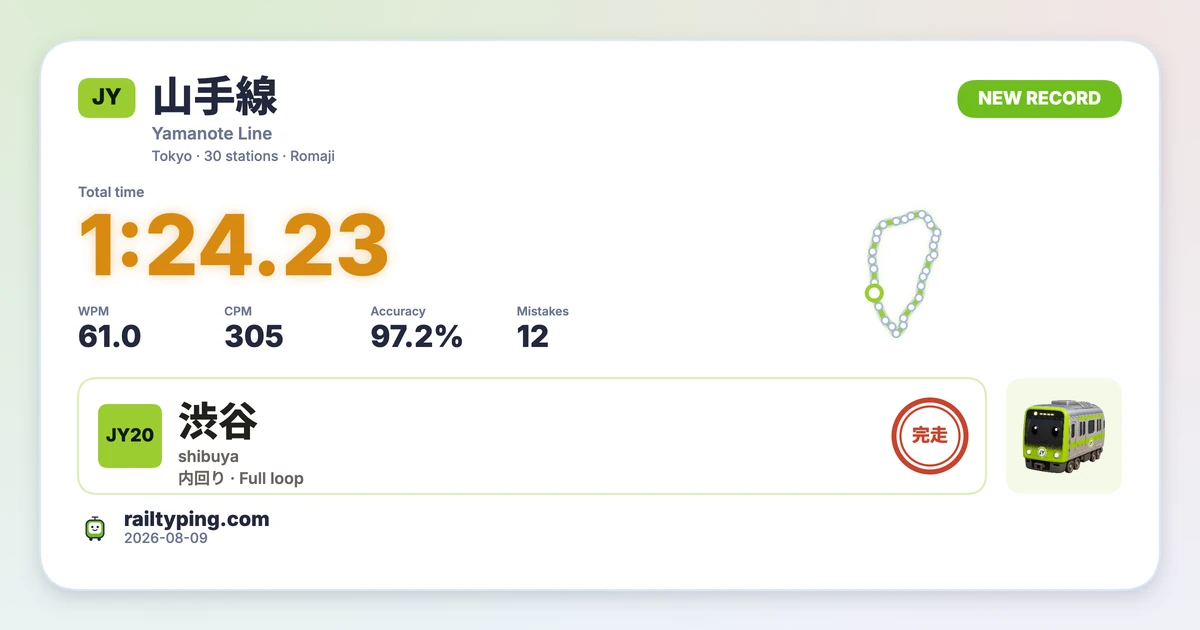
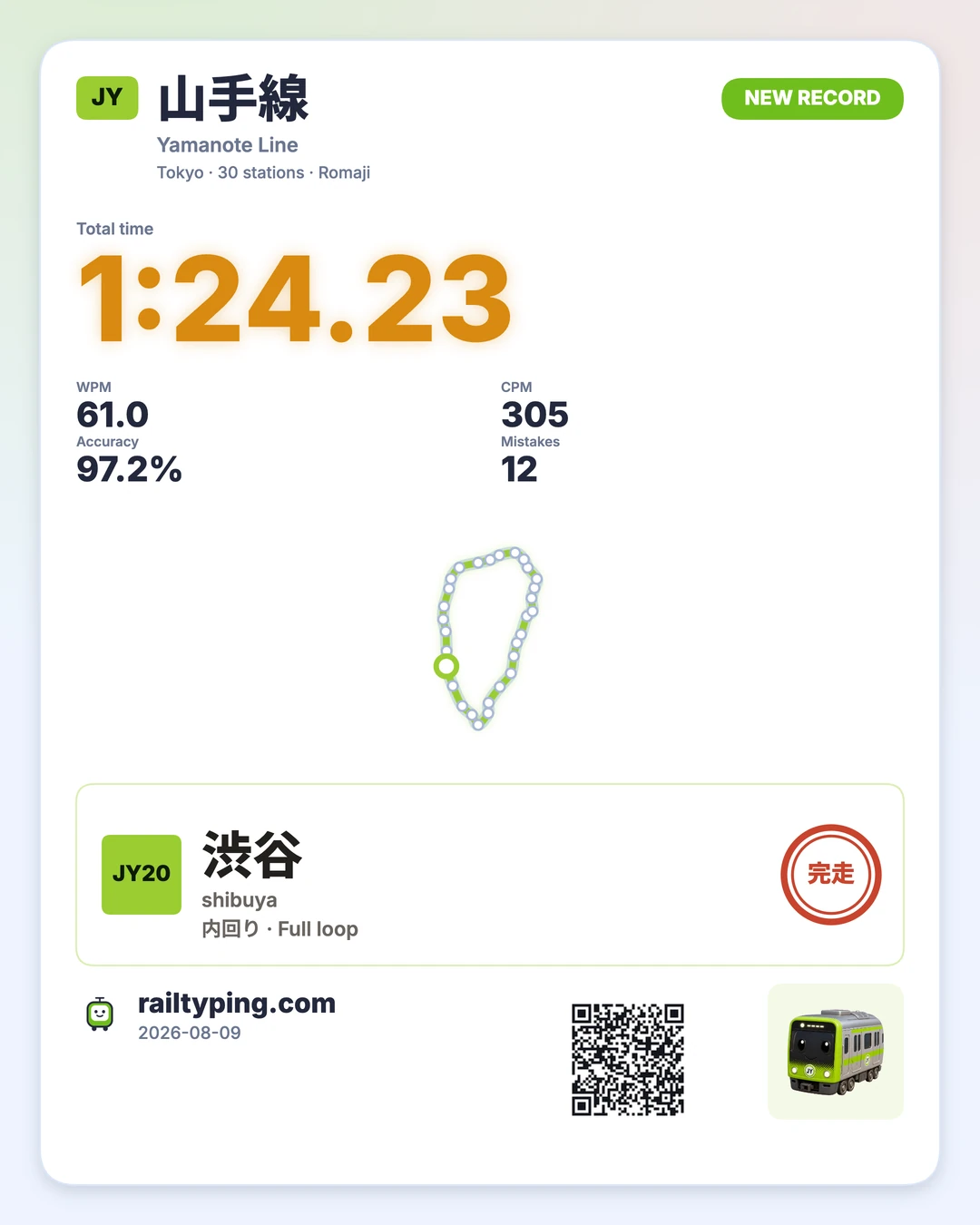
A fast lap deserves something better than a cropped screenshot. Rail Typing now has a built-in result share card that turns a finished run into a polished image: your total time, WPM, CPM, accuracy, mistakes, route and station sign, all arranged around the line you just completed.
The card is ready from the result page, needs no design app, and carries a link back to the same challenge. It is useful whether you want to post a new personal best, compare a Japanese typing score with friends, or keep a visual record of a particularly clean Yamanote Line lap.
How to make a Rail Typing result card
Finish any normal line, then select Share result on the result page. The preview is the real image that will be saved—there is no separate export layout waiting to surprise you.
From the share window you can:
- Choose a wide or tall format.
- Switch between the light and dark themes.
- Download the result as a PNG, copy the image where the browser supports it, open the device share sheet, or copy the ready-made text and challenge link.
The buttons adapt to the browser. For example, browsers without image clipboard support still offer the dependable download and link options.
Wide for chats, tall for social feeds
The wide card uses a 1200 × 630 layout, the familiar 1.91:1 shape used by link previews and posts on services such as X and Discord. It keeps the time and core typing statistics readable even when the image appears as a compact chat attachment.
The tall card uses a 1080 × 1350 layout for portrait feeds such as Instagram and Xiaohongshu. It has room for a larger route map and adds a QR code, so someone seeing the image outside a clickable post can still open the challenge. Both layouts are rendered at 2× resolution before download to keep type and map lines sharp.
A typing score that still looks like the railway
This is more than a generic panel of numbers. Each card keeps the identity of the run:
- The line name, code and colour, plus the start station and direction.
- Total time, WPM, CPM, accuracy and mistake count.
- The selected input mode, route length and a miniature route map with the start point marked.
- A new-record badge when the run is a personal best, and leaderboard rank or player name when available.
- The line’s train mascot and a station-style completion mark.
The railway details also change by city. Japanese lines use their station-code tile and completion stamp, while London lines use the visual language created for that network. The card is not forcing every city into a Tokyo template.
The card speaks the language of the page
Share cards are localized in all five Rail Typing languages: English, Japanese, Simplified Chinese, Traditional Chinese and Korean. Labels such as total time, accuracy, new record and route summary follow the language you are playing in, while real station names and railway markings stay authentic.
That localization applies to both the image and the text copied beside it. A Japanese page makes a Japanese card; a Korean page makes a Korean card. There is no English-only graphic hiding behind a translated button.
The link opens the same typing challenge
A result image is more useful when it starts a rematch. The copied link—and the QR code on the tall card—opens the setup page with the original line, direction, input mode and romaji style already filled in, plus the start station on loop lines. Your friend can see what you ran and start under the same conditions without reconstructing the setup from a screenshot.
That makes the card a small challenge invitation: post the score, let someone scan it, and see who can beat the time. The URL contains the setup, not your private result data.
Drawn locally in your browser
The PNG is drawn in the browser with Canvas 2D after the result page loads. Generating a card does not upload the image to a rendering service. The same bitmap shown in the preview is the one sent to download, clipboard or the system share sheet when you choose that action.
This also lets the card use the fonts and railway artwork already loaded by the game, including Japanese, Simplified and Traditional Chinese, and Korean text without turning the server bundle into a collection of giant font files.
Make a card from your next run
Start with the Yamanote Line typing challenge, complete a lap, and select Share result. Try the wide version for a group chat and the tall QR version for a feed post.
If the number on the card is not where you want it yet, the guide to improving typing speed and the weakness drill are good places to prepare for the next attempt. Then share the rematch—not just the screenshot.